


Heritage: Ancestry & Ethnicity
4.5101.00 Reviews
App Specs
- Version
- 1.0.11
- Updated On
- License
- Free
- Downloads
- 10,000+
- Developer
- Denali Digital
- Categories
- Lifestyle
- Platform
- Android
Screenshots

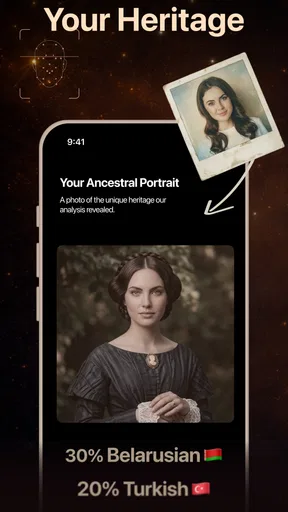
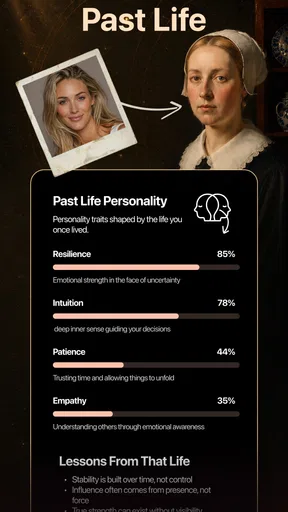
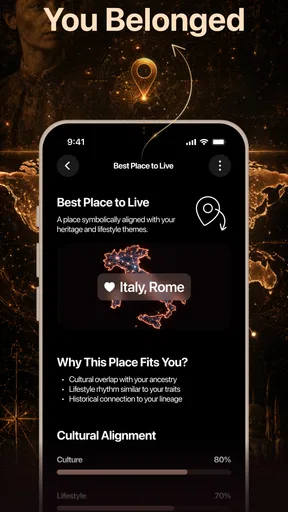
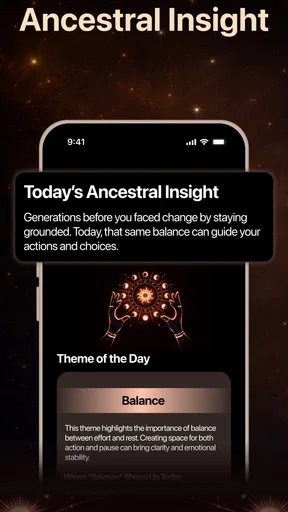
 Analysis by AppCompare
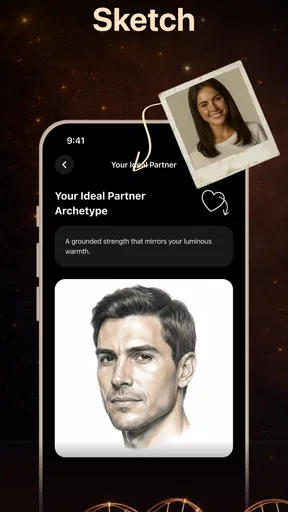
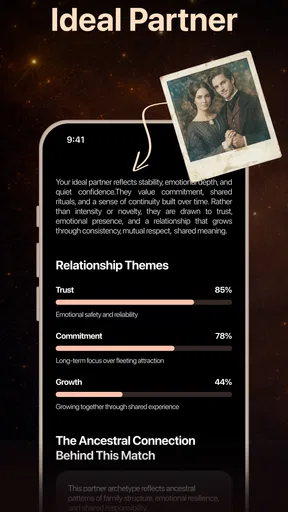
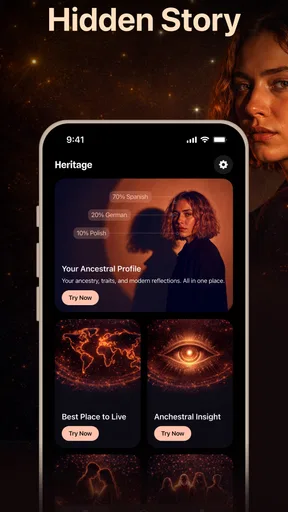
I approached Heritage: Ancestry & Ethnicity as a light, curiosity-driven lifestyle app rather than a replacement for formal genealogy. Its central idea is simple: upload one selfie and receive an AI-based ethnicity test, a past-life interpretation, and a soulmate sketch. That combination makes it more playful than the usual family-tree tools, but it also means you need to judge it by the right standard. I would not use it to establish family history. I would use it as a quick conversation starter, a personal novelty, or a creative way to explore questions about identity.
The app comes from Denali Digital and is available for free, with optional in-app purchases ranging from $6.99 to $39.99 per item. It sits in the lifestyle category, carries an Everyone age rating, and supports devices running Android 7.0 or later. Its current version is 1.0.11, and the app has reached over 10 thousand installs. Those details matter because they place it closer to an accessible entertainment experience than to a specialist ancestry service.
How I would decide whether Heritage is right for me
I’d decide by asking whether I want a playful prompt or a dependable answer. If a selfie-based interpretation sounds entertaining and I can keep its limits in mind, I’d try it without treating the result as evidence or relationship advice. I’d also consider whether I’m comfortable using a personal photo and setting a spending boundary before exploring further. From there, the key question is whether the novelty gives me a reason to return.
Start with the kind of answer you actually want
The first decision is whether you want evidence or imagination. If your goal is to trace relatives, inspect historical records, build a documented family tree, or learn about migration through verified sources, this is not the category I would choose. A genealogy platform is designed around names, documents, dates, and relationships. Heritage takes a different route: it turns a selfie into an AI-generated interpretation.
That distinction does not make the app pointless. It simply changes the question it can reasonably answer. I see it as a reflective and entertaining experience, not a scientific test. The ethnicity result may be interesting to compare with what you already know about your family, but I would never treat a facial impression as proof of ancestry. Appearance can overlap across many populations, and a photograph cannot replace family records or a properly designed genetic analysis.
The past-life and soulmate elements also work best when approached as creative prompts. They can give you something to think about or share with friends, but they should not guide major personal decisions. If you are comfortable with that playful boundary, the concept is easy to understand. If you expect a precise explanation of your heritage or a dependable prediction about relationships, I would save your time and choose another type of app.
Consider the selfie before you begin
Because the experience is built around a single selfie, the quality and character of that image become important. I would use a recent front-facing photo with a clear view of my face, even lighting, and a neutral expression. I would avoid a group picture, a heavily filtered image, sunglasses, or a dramatic angle. This is not because the app promises laboratory precision, but because a clean input gives the interpretation the best chance of being coherent.
Worth Reading Before You Choose

EA SPORTS FC Mobile 26 Is a Bigger Football Game, but It Takes Time

Flipboard Shows What News Apps Must Do Beyond the Feed

Switching to Android Auto Means Rethinking Your Driving Routine

Google Calendar Makes a Crowded Week Easier to Manage

Ludo King Makes the Most of the Minutes Between Plans

Baby Panda World Brings Quick Play to Modern Phones, but Its Game Library Feels Busy
A useful tip is to keep the original photo separate from the result. If you want to compare different looks, take notes about which image you used rather than repeatedly changing everything at once. That makes any difference easier to understand, even if the results remain interpretive. I would also avoid uploading a picture of someone else without their permission, especially when the result may be shared socially.
Another practical consideration is expectation management. A generated sketch or reading can feel personal because it is presented in relation to your face, yet the emotional impact does not make it factual. I found the experience more enjoyable when I treated each output as a prompt: “Does this description resonate with me?” rather than “Is this objectively who I am?” That small change prevents the app from becoming misleading.
Look at the audience and the payment model together
The Everyone rating makes the app approachable for a broad audience, but I would still encourage younger users to discuss purchases with a parent or guardian. The free entry point is useful for deciding whether the style suits you, while the optional purchases mean the full experience may not end with the first screen. Before confirming any purchase, I would read the wording carefully and check whether I am paying for a specific result or for an extended part of the experience.
This is one of the most important decision points. Someone looking for a quick novelty may be satisfied without spending anything. Someone who wants to explore every available interpretation should decide in advance how much that entertainment is worth. I would not buy impulsively just because a result feels surprisingly accurate. Emotional reactions are exactly when it is easiest to lose track of the difference between curiosity and value.
Think about privacy in practical terms
A selfie is personal even when it is shared for entertainment. Before using any image-based app, I make a habit of checking the permission and privacy information shown on the device and in the store. I also choose a photo that reveals as little extra information as possible: no visible address, workplace badge, school uniform, or other people in the background.
That workflow is especially sensible here because the app’s defining input is your face. I would not use a photo pulled from a public profile if I could use a simple, private image instead. After receiving the result, I would think twice before posting the full screen publicly, since screenshots can include more context than intended. This is not a criticism unique to Heritage; it is the sensible trade-off whenever a service asks for a recognizable image.
Where the app wins against conventional ancestry tools
The strongest advantage is immediacy. Traditional ancestry research can take patience and organization before it becomes rewarding. Heritage offers a much shorter path from curiosity to a result. I can open a lifestyle app, provide one selfie, and explore several identity-themed outputs without first collecting documents or learning a research system.
That makes it a good fit for a casual evening with friends. One person might try the ethnicity interpretation, another might be more interested in the past-life reading, and the soulmate sketch can become a visual conversation starter. The app does not require everyone to arrive with a family tree or a detailed understanding of genealogy. Its low barrier is the point.
I also like that the three themes appeal to different kinds of curiosity. The ethnicity angle connects to identity, the past-life angle is more imaginative, and the soulmate sketch is relationship-oriented. If one area feels uninteresting, another may still provide a reason to continue. That variety gives the app more range than a single-result novelty tool.
Its rating of 4.5 from roughly 4.7 thousand ratings suggests that many users enjoy the general experience, although I would not read that figure as evidence that the interpretations are accurate. Ratings are better understood here as a sign of entertainment appeal and usability. They do not turn an AI-generated result into ancestry evidence.
Small habits that make the experience more useful
I would save the result only after reading it calmly. The first reaction is often the strongest, but a second look helps separate genuinely interesting details from broad statements that could apply to many people. If the app presents several interpretations, I would compare their tone and specificity instead of accepting every line equally.
A second useful habit is to use the result as a prompt for real-world research. If an ethnicity interpretation reminds you of a family story, ask relatives about that story or look for documents that support it. In this workflow, the app becomes a starting point rather than an authority. The AI output supplies curiosity; your family conversations and records supply the evidence.
A third tip is to avoid using the app when you are looking for reassurance about a sensitive relationship. A soulmate sketch can be fun, but it should not influence whether you trust someone, pursue someone, or end a relationship. For those decisions, direct communication and observed behavior are much more useful than any generated portrait.
Where another category may fit better
If I wanted documented ancestry, I would choose a genealogy service built around records and family connections. That kind of tool is slower but better suited to serious research. If I wanted biological ethnicity estimates, I would investigate a properly validated genetic-testing route and read its methodology carefully. A selfie-based interpretation cannot provide the same kind of information.
If I wanted a soulmate portrait purely as art, a dedicated image-generation or portrait app might offer more control over style, pose, and appearance. Heritage is more convenient when the appeal is the combination of identity reading and relationship-themed output. It is less suitable when visual customization is the main goal.
There is also a simple alternative: talk to relatives and collect family stories. That costs nothing and can reveal details a generated result never could, including names, places, photographs, and memories. The trade-off is that family stories may be incomplete or inaccurate too. I would use Heritage to spark that conversation, not to replace it.
The real cost of switching from curiosity to research
Moving from this app to a conventional ancestry platform changes the amount of work involved. You may need to gather names, organize dates, scan documents, and resolve contradictions between family accounts. That effort is worthwhile if you want a lasting family record, but it is unnecessary if you only want a quick, playful experience from a selfie.
The reverse switch has a different cost. If you move from a research service to Heritage expecting the same depth, you give up documentation and gain speed. You may enjoy the immediacy, but you will need to accept that the result is interpretive. In my view, the best choice depends less on which app is “better” and more on whether your priority is evidence, reflection, or entertainment.
The purchase structure adds another switching consideration. Heritage is free to try, while some items cost between $6.99 and $39.99 each. A serious genealogy service may involve a different payment model altogether, but I would not compare prices without first comparing what each category delivers. Paying for a generated reading is sensible only if you value the experience itself, not if you expect it to substitute for research.
Who I would recommend it to
I would recommend Heritage to someone who enjoys personality-style apps, visual experiments, and light discussions about identity. It is especially suitable for a short shared activity: use a clear selfie, read the output together, and treat the result as an invitation to tell stories. It may also appeal to people who want a creative prompt when journaling about family, relationships, or personal identity.
I would not recommend it to someone who needs a defensible ethnicity result, is building a family tree, or feels vulnerable to predictive relationship claims. I would also skip it if I am uncomfortable submitting a facial image to an app or if I am likely to make an in-app purchase while caught up in an exciting result. In those situations, a records-based tool, a carefully researched genetic service, or no app at all would be the better decision.
My recommendation after weighing the trade-offs
My overall view is positive, with a clear boundary: Heritage is enjoyable as a lightweight AI lifestyle experience, but it should not be mistaken for a scientific ancestry service. Denali Digital has chosen a format that is quick to understand and easy to share, and the combination of ethnicity, past-life, and soulmate themes gives the app a distinctive reason to exist.
I would start with the free experience, use a careful selfie, and decide beforehand whether the entertainment is worth any optional purchase. I would then compare the result with real family knowledge rather than accepting it as a conclusion. That approach preserves the fun while avoiding the app’s biggest weakness: the temptation to give generated interpretations more authority than they deserve.
For me, the final decision is straightforward. Choose it when you want a playful conversation starter built around one photo. Choose a genealogy or evidence-based alternative when you want facts you can verify. Used within that limit, Heritage: Ancestry & Ethnicity is an accessible free app with enough variety to keep a curious user engaged, provided the user remembers that its value is in the experience and the questions it inspires—not in proving where anyone came from.
Pros
- Clear ancestry breakdowns make family origins easy to understand.
- DNA matching can help identify previously unknown relatives.
- Family tree tools support organized research across multiple generations.
- Historical records add useful context to ancestors and locations.
- The interface is approachable for users new to genealogy research.
Cons
- Some features require a paid subscription or additional purchases.
- Ethnicity estimates may change as the reference database is updated.
- Results can be less accurate for regions with limited genetic data.
- Privacy settings should be reviewed carefully before sharing DNA information.
- Large family trees may become difficult to manage on smaller screens.
FAQs for Heritage: Ancestry & Ethnicity
What is Heritage: Ancestry & Ethnicity used for?
Heritage: Ancestry & Ethnicity is designed to help users explore their family background and learn more about possible ancestral origins. Depending on the features available in your version, you may be able to build a family profile, review ethnicity information, organize relatives, and discover historical context connected with different regions. It is best viewed as an exploration tool rather than a definitive record of your identity.
How accurate are the ancestry and ethnicity results?
Results should be treated as estimates, not absolute proof of your heritage. Ethnicity calculations are based on reference databases, statistical comparisons, and the information or sample provided by the user. Different services may produce different percentages, especially for neighboring regions or populations with shared history. Family documents, interviews with relatives, and official genealogy records are useful for confirming or adding context to anything shown in the app.
Does Heritage: Ancestry & Ethnicity require a DNA test?
The app’s requirements can depend on the specific feature you want to use. Some ancestry applications provide educational tools, family-tree functions, or heritage information without a DNA test, while more detailed ethnicity estimates may require a compatible genetic report or testing service. Before downloading or subscribing, check the current app description and permissions to understand whether testing, an uploaded file, or only manually entered family information is needed.
Is my personal and genetic information safe in the app?
Before using Heritage: Ancestry & Ethnicity, review its privacy policy and the permissions requested on your device. Family names, birth details, photographs, location information, and genetic data can be highly sensitive. Pay close attention to whether information is stored online, shared with service providers, used for research, or deleted when you close an account. Avoid entering details about living relatives without their knowledge and consent.
Is Heritage: Ancestry & Ethnicity free to download and use?
The application may be available to download at no initial cost, but some tools can be restricted by subscriptions, in-app purchases, advertising, or limited access to premium reports. Check the store listing for the current pricing, trial conditions, renewal terms, and cancellation instructions before starting a trial. If you only want basic family-history exploration, compare the free features with the paid options to decide whether the upgrade is worthwhile.


